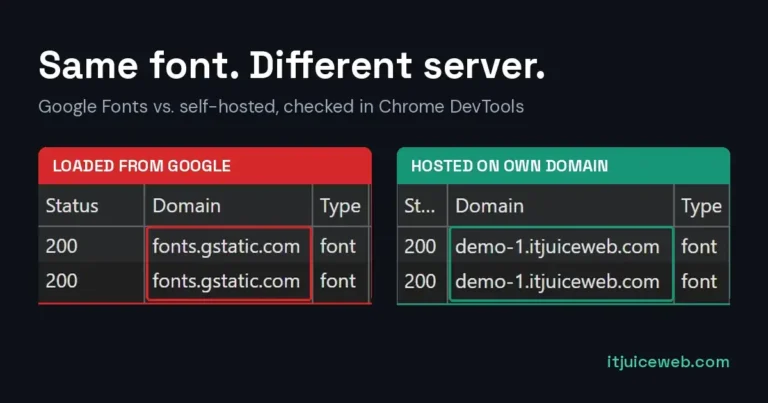
Google Maps GDPR Check: Is Your Map Sending Data to Google?
Your website might have a map in the footer or on the contact page. It looks harmless. But the moment someone opens the page, that map connects their browser to Google and sends their IP address along, before they click anything. This is the Google Maps GDPR issue, and like the fonts problem, it takes a minute to check.
Why an embedded map is a privacy problem
An embedded Google Map isn’t just a picture. It’s a piece of Google’s code running on your page. To show the map, the visitor’s browser loads scripts, map tiles and fonts straight from Google’s servers, and every one of those connections includes the visitor’s IP address.
Under GDPR, an IP address counts as personal data. It’s the same reason a Munich court ruled against a website owner for loading Google Fonts without consent (I wrote about that case here). A map works on exactly the same principle, only with far more connections.
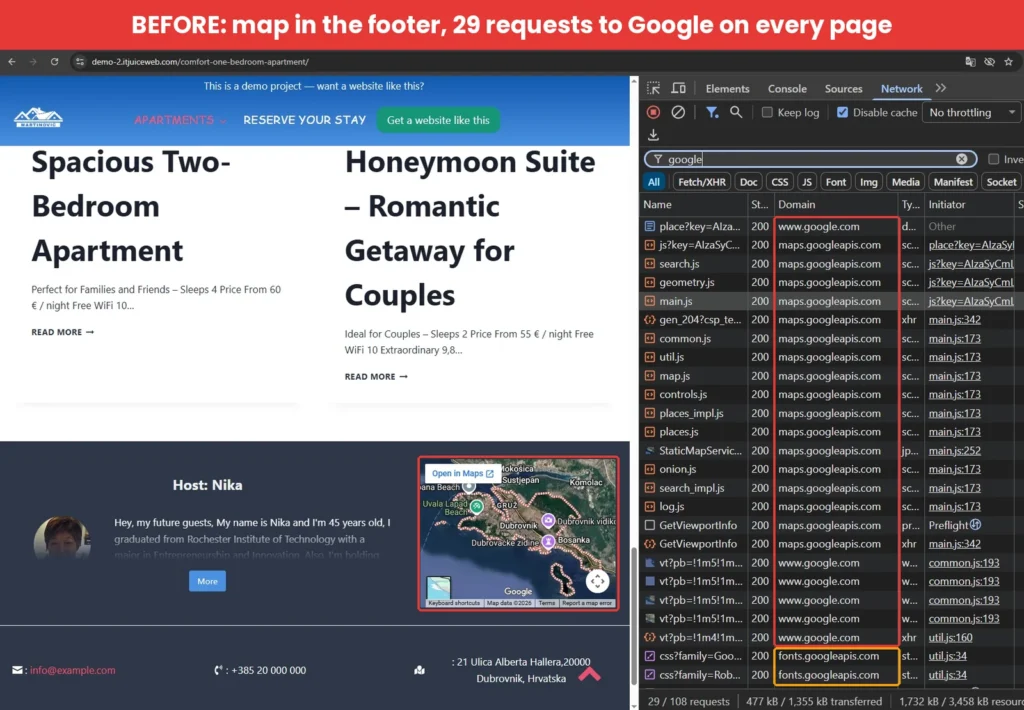
On my demo site, a single map in the footer made 29 requests to Google on page load. And because it sits in the footer, that happens on every page of the site, not just the contact page.
“But my map is lazy loaded.” Lazy loading only delays the problem. The map loads when the visitor scrolls down to it, and at that point the IP address still goes to Google, still without consent.
How to check your website in one minute
Same check as for fonts, just a different filter:
- Open your website in Chrome.
- Right-click anywhere on the page and choose Inspect.
- Click the Network tab and tick Disable cache.
- Click All and type “google” in the filter box.
- Reload the page (F5 or Ctrl+R) and scroll down to the map.
- Look at the Domain column.
If you see maps.googleapis.com, maps.gstatic.com or www.google.com, your map is talking to Google before the visitor has agreed to anything.
The map brings Google Fonts back
Here’s something most people don’t expect. Even if you’ve already hosted your fonts locally, an embedded map loads its own fonts from Google. Google Maps uses Roboto and Google Sans for its labels and buttons, and it pulls them from fonts.googleapis.com.
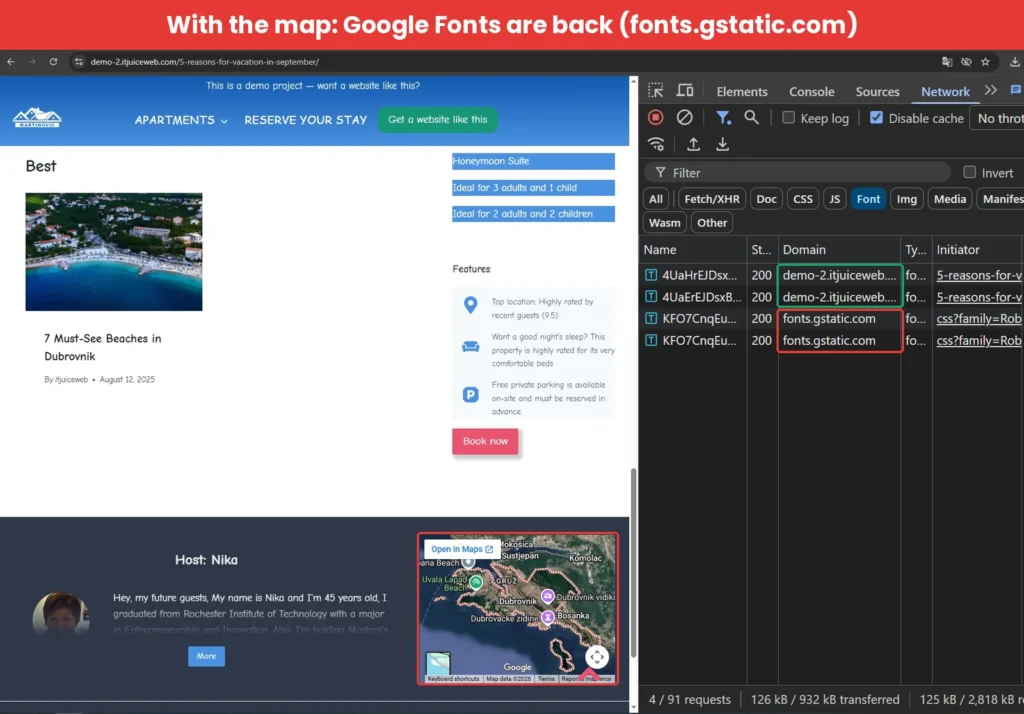
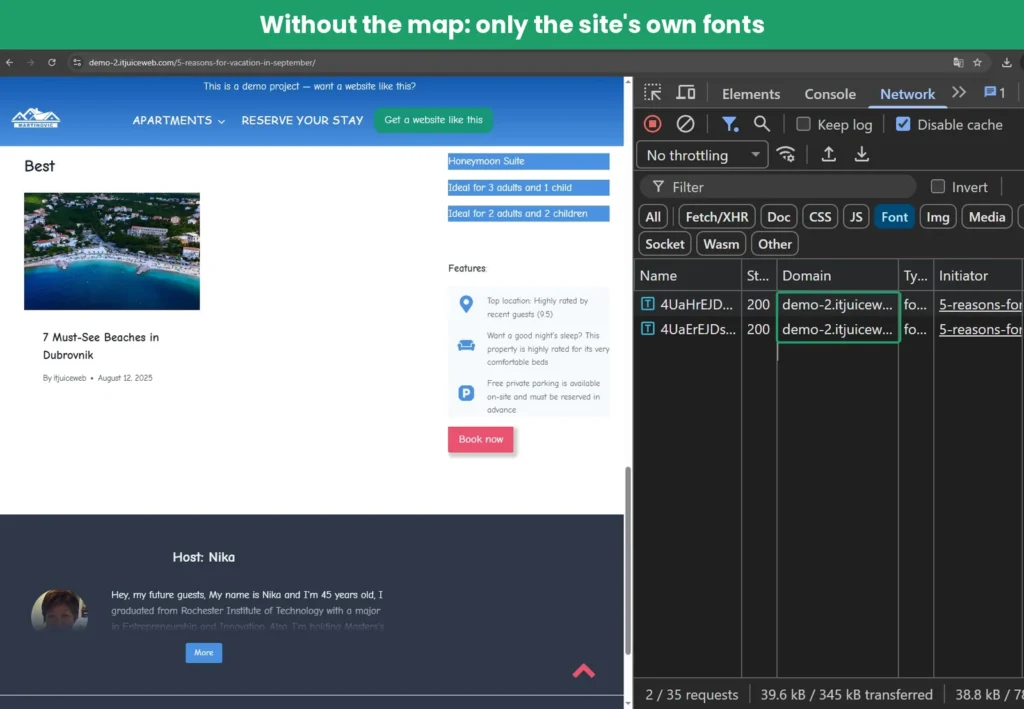
On the demo site, the theme uses only locally hosted fonts. With the map in the footer, Google Fonts still showed up. Without it, only the site’s own fonts loaded, and the page dropped from 91 requests to 35.
So if you’ve fixed your fonts but still see Google in the Font filter, check for a map.
How to fix it: load the map only after consent
The solution is known in Germany as the 2-Klick-Lösung (two-click solution). Instead of the real map, visitors first see a placeholder. The map only loads when they click it or accept cookies. No click, no connection to Google.
Option 1: a consent plugin with a content blocker
I tested this with Complianz, a free WordPress plugin. It shows a cookie banner and, more importantly, blocks the map until the visitor agrees.
- Install and activate Complianz – GDPR/CCPA Cookie Consent.
- In the setup wizard, choose European Union (GDPR) as your region.
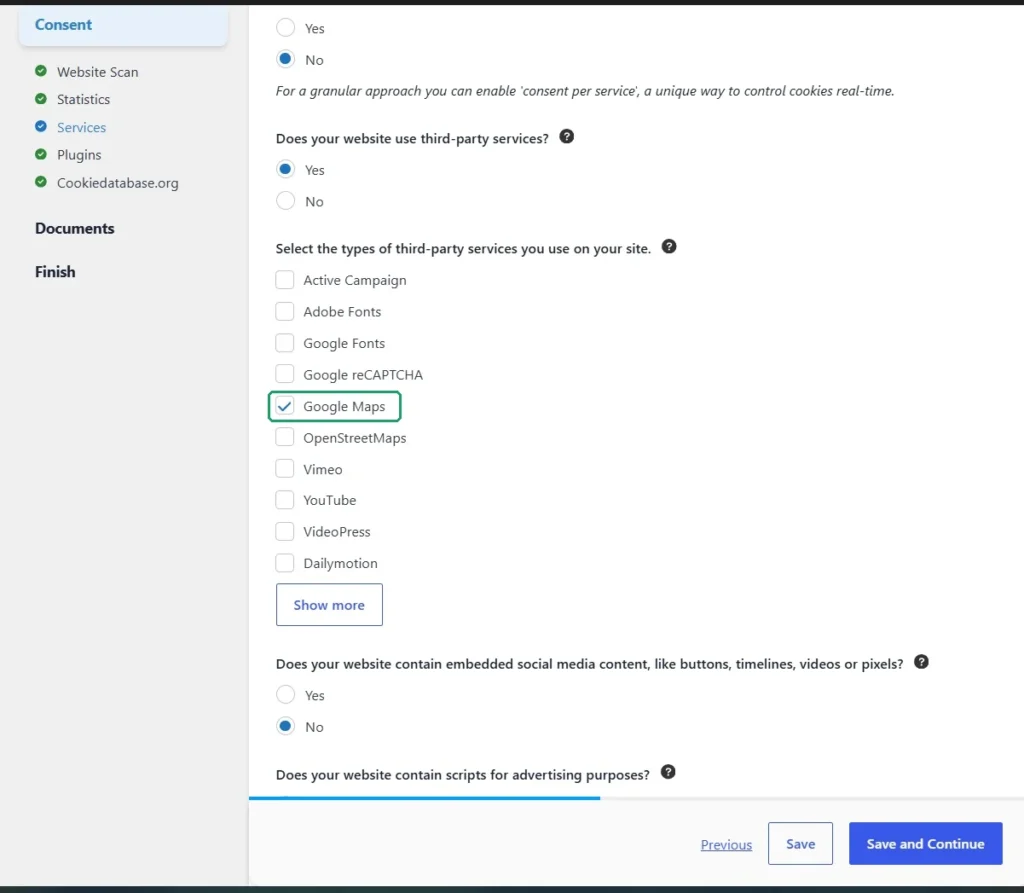
- Under Consent → Services, answer Yes to third-party services and tick Google Maps.
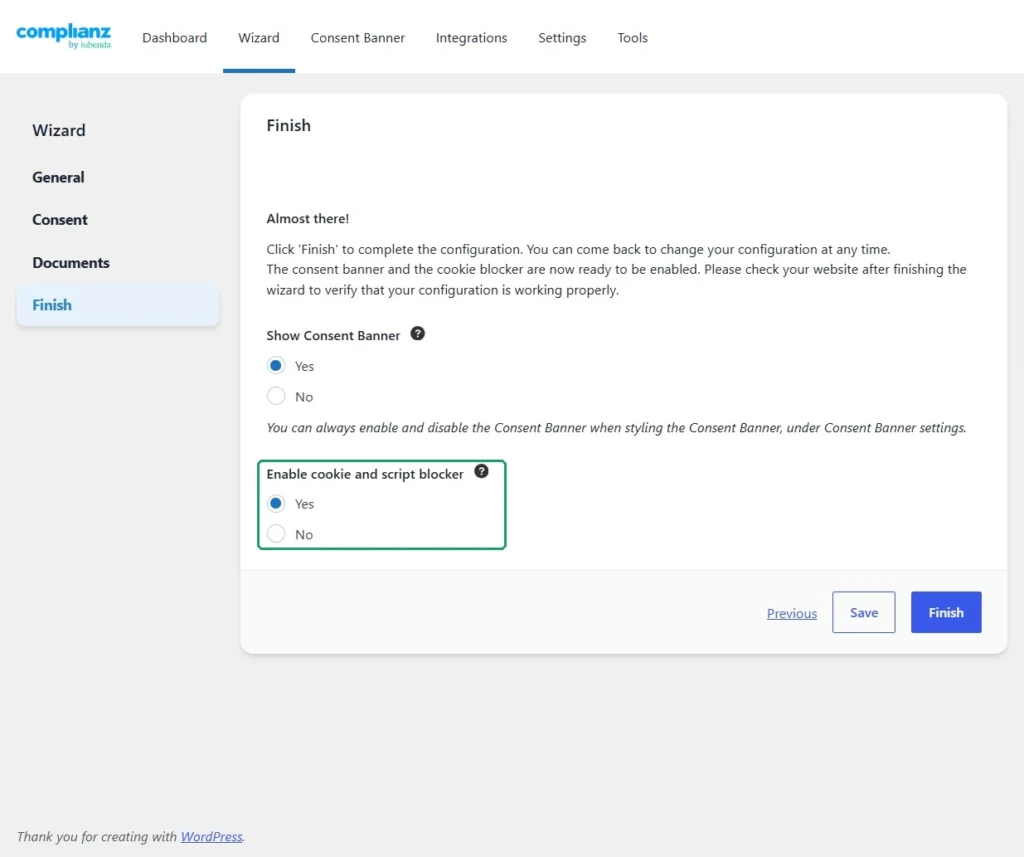
- On the Finish step, set both Show Consent Banner and Enable cookie and script blocker to Yes. The second one is the one that matters. Without it, the banner is only decoration and the map loads anyway.
- Clear your cache (caching plugin, server and CDN).
- Open the page in a private/incognito window and run the check again. Use a fresh window, because once you click Accept, the plugin remembers your choice.
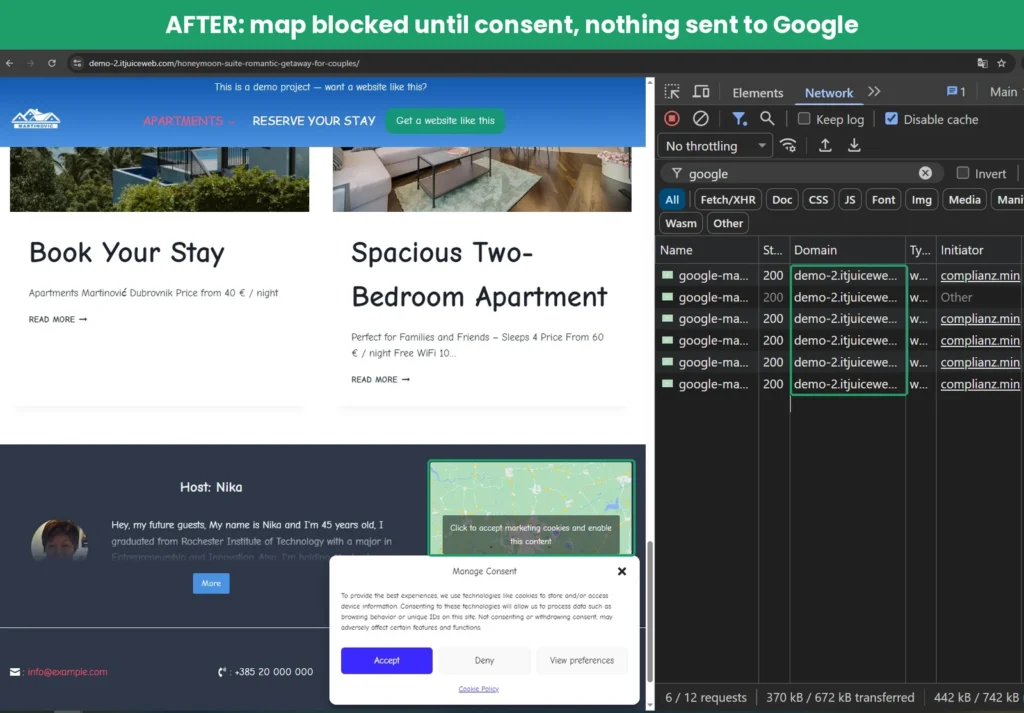
Before consent, the map is replaced by a placeholder. The only matches for “google” are Complianz’s own placeholder images, served from the site’s domain. Nothing goes to Google.
My demo map was added with the Kadence Google Maps block, and Complianz didn’t list a Kadence integration. It still blocked the map, but it’s a good example of why you should always run the check after setup instead of assuming it works.
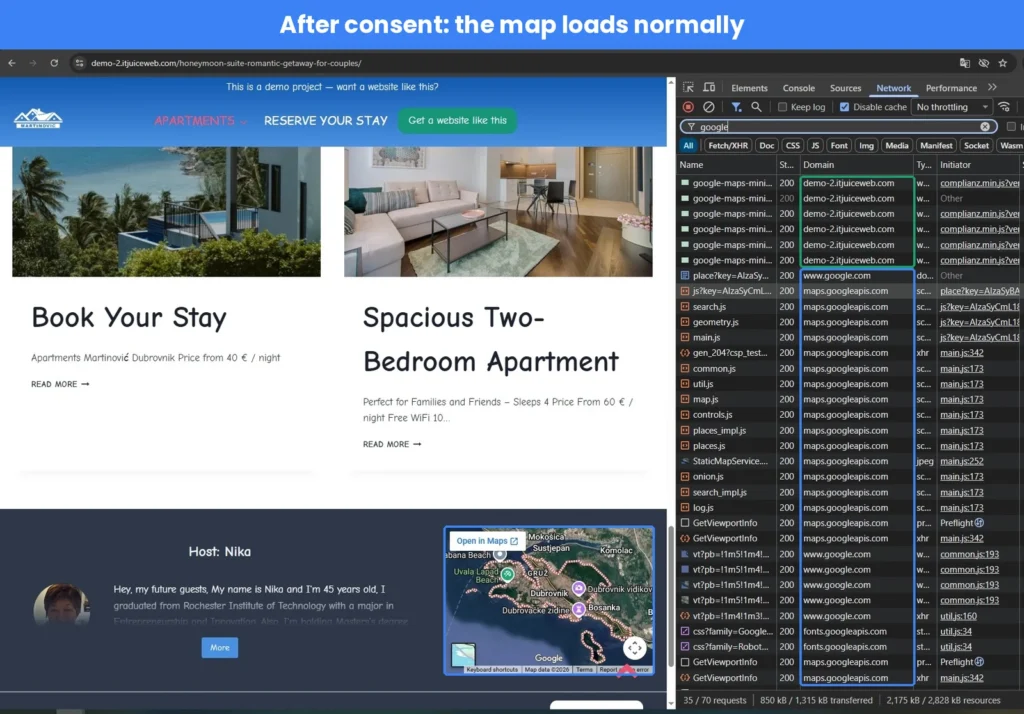
After the visitor clicks Accept, the map loads normally. The connection to Google still happens, but now with consent.
If you already use a cookie plugin, check whether it has a content blocker for Google Maps. Many do, but it’s not always switched on.
Option 2: an image with a link
If the map is only there to show where you are, you don’t need a live map at all. Take a screenshot of the map, add it as an image, and link it to your location on Google Maps with a button like “Open in Google Maps”.
The visitor gets the same information, and your site makes zero connections to Google. It’s also the fastest option: no plugin, and the page loads lighter.
I used this approach on a real client site: the address on WinTeam’s website is a plain link to Google Maps. No map embed, no consent banner needed for it, and visitors still get directions in one tap.
What about YouTube videos?
Embedded YouTube videos work the same way: they load from youtube.com, i.ytimg.com and googlevideo.com as soon as the page opens.
A common “fix” is the privacy-enhanced mode, youtube-nocookie.com. It reduces cookies until the video is played, but the browser still connects to Google’s servers, so the IP address still goes along. It’s better than nothing, but it’s not the same as blocking the video until consent. The same content blocker that handles maps usually handles YouTube too.
One of the small things worth checking
This article isn’t legal advice. It’s one of the technical checks I do on every site I build or maintain, because it takes a minute and removes a risk nobody needs.
If you haven’t checked your fonts yet, start there: Google Fonts GDPR Check: Test Your Site in 1 Minute.
Want a second pair of eyes on your website? Get in touch and I’ll tell you what I’d fix first.